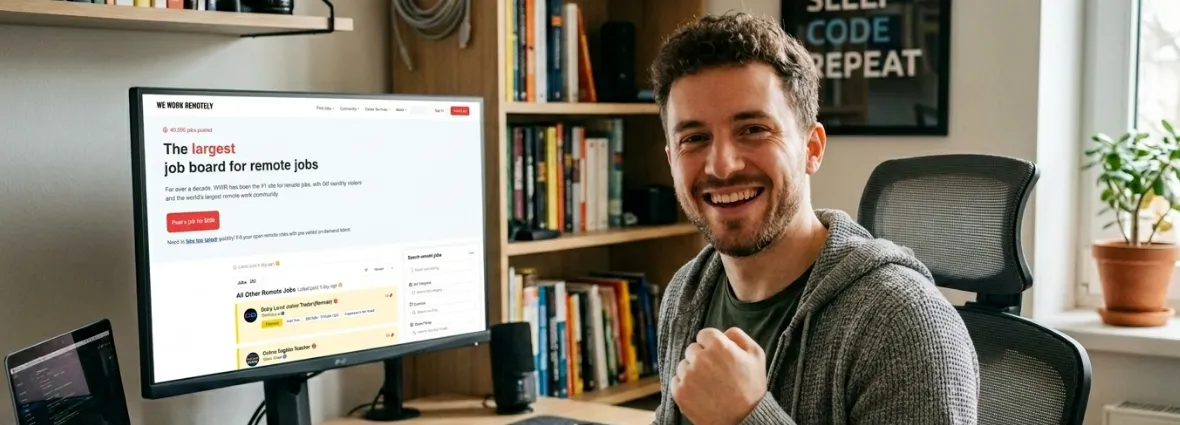
How to land a job on one of the most prestigious remote job boards on the planet? We Work Remotely (WWR) has established itself over its 14+ year history as the pioneering and undisputed leader in connecting professionals with 100% remote vacancies. Founded in 2011 by the prestigious Canadian firm Tiny, this job board stands out for the quality and integrity of its listings.
However, for a first-time user, the process can seem overwhelming: How do I register? What will companies ask of me? How do I stand out among hundreds of candidates from all over the world? To ensure maximum transparency in your job search, in this guide we analyze market information, candidate reviews, and hiring statistics updated as of June 20, 2026.
Below, we present a detailed, step-by-step guide structured with practical tables and lists so you can master the application process from the initial registration to submitting your resume.
1. How to apply to We Work Remotely in 5 simple steps
Step 1: Register on their platform and create your profile (Recommended)
Although you can apply for any job without being registered, accessing the We Work Remotely Candidate Registration section and creating a Candidate Profile on the platform is highly recommended if you want companies to find you proactively. Companies that pay to post on WWR have access to a private database of registered profiles. If you already have several versions of your resume prepared, you can upload and manage them centrally in My Resumes on Workwii to use them quickly when applying.
When entering the official platform to register, you will see two options: Job Seeker and Employer. Make sure to select Sign in as a Job Seeker and press Continue. Avoid registering as an Employer, as that section is intended for companies and will ask you for payment per post. I recommend registering using your Google account to speed up the process, or via your primary email address.
Tip on the registration method: It is advisable to sign in using your Google account, as it speeds up registration to a single click and saves you from creating another password. However, only do this if your Google account is associated with your professional email (e.g., firstname.lastname@gmail.com). If you use an account with an informal email (e.g., gamerpro99@gmail.com), it is preferable to perform the manual registration by entering a professional email address, as this is the address that recruiters will see.
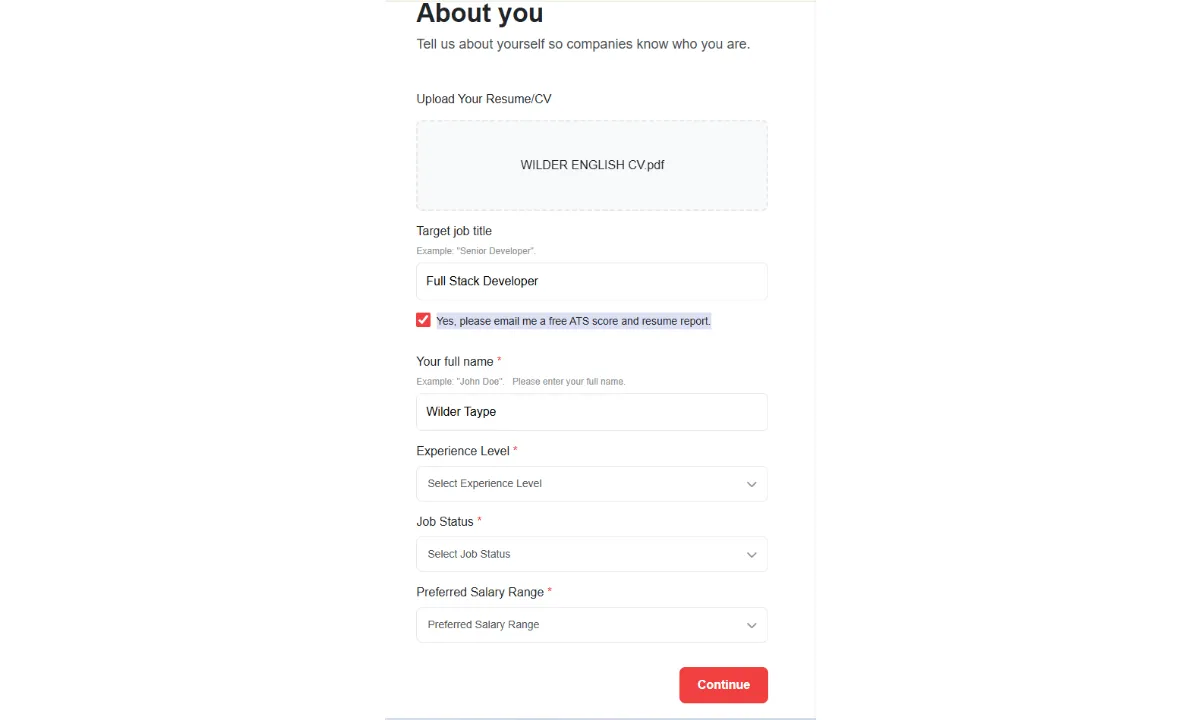
Screen 1: "About You" Form
During the registration process, the platform will ask you to complete your details in the About You section so that companies can get to know your profile. We recommend completing them using the following key criteria:
Upload Your Resume/CV: You must upload your resume in PDF format and written entirely in English (e.g., FirstName_LastName_Resume.pdf*).
Target job title: Write the main role you are aspiring to (e.g., Full Stack Developer, Frontend Engineer, UX/UI Designer*). It must be a specific and direct job title.
ATS score report: Keep the box "Yes, please email me a free ATS score..."* checked to receive free feedback and suggestions on your resume via email.
Experience Level: Select Mid-Level or Senior*. The vast majority of vacancies on WWR look for professionals with this level of experience.
- Job Status: Choose Actively looking to indicate that you are immediately available to start interviews.
- Preferred Salary Range: Select an annual range in USD consistent with your expectations. For developers in LATAM, a realistic starting range is usually between $50,000 - $80,000 USD/year (approximately between $4,000 and $6,500 USD per month), which can rise to $80,000 - $100,000+ USD/year for advanced Senior profiles.
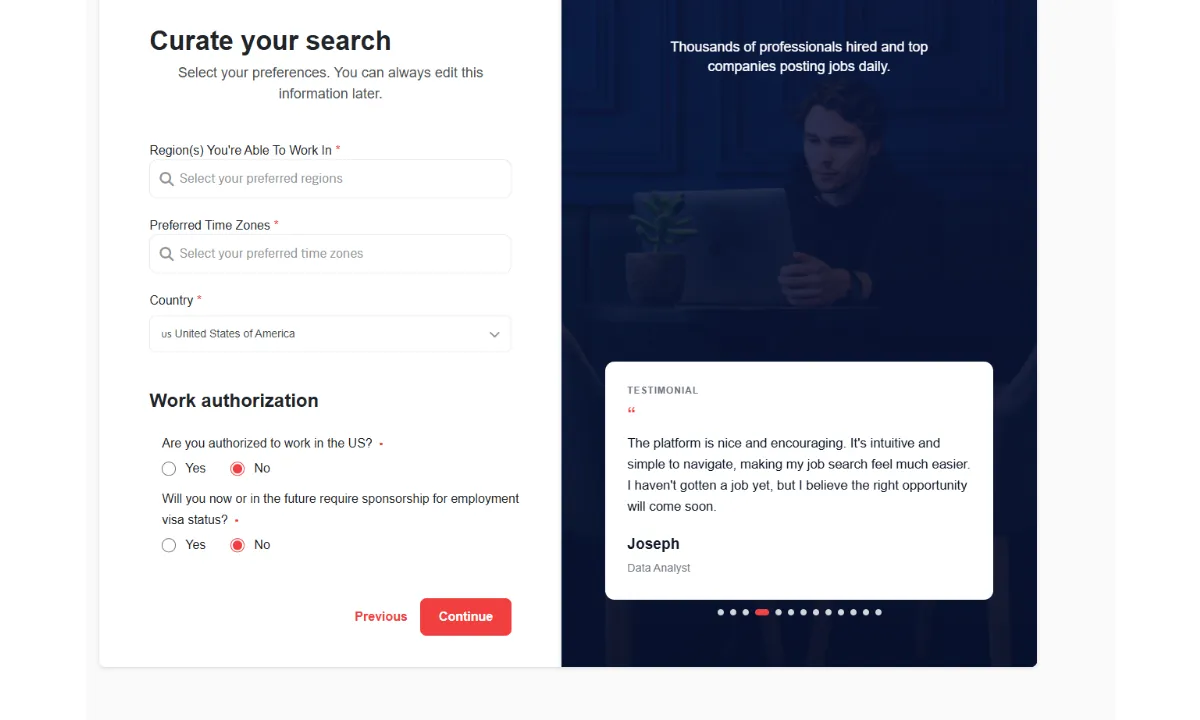
Screen 2: "Curate your search" Form (Preferences and Authorization)
In the second step of the registration, you will configure your geographic and hiring preferences. Complete the fields with these key recommendations:
- Region(s) You're Able To Work In: Select Americas to apply for vacancies on the continent. If your English is fluent and you are willing to adapt to European time zones, you can also add Europe.
Preferred Time Zones: Select time zones compatible with the Americas (e.g., EST / UTC-5, CST / UTC-6, PST / UTC-8*) to show schedule overlap with U.S. companies.
Country: Select your actual country of residence (e.g., Peru). It is vital to be honest; lying in this field will cause an automatic rejection at the time of identity and tax verification (filling out the W-8BEN form) for professional service contracts (Contractor*).
- Work Authorization and Visa Sponsorship: Choose No to the question of whether you have authorization to work in the U.S. and No to the question of whether you require visa sponsorship. When working remotely as an independent B2B contractor, you do not need a physical U.S. work visa or relocation sponsorship.
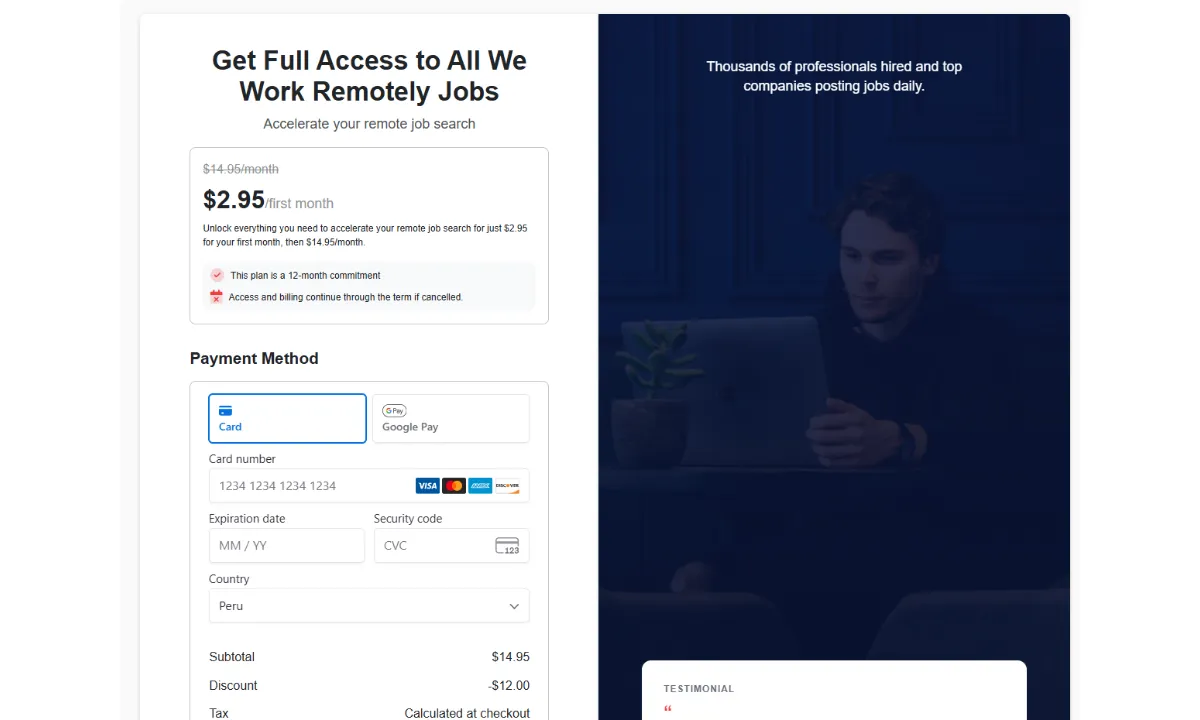
Screen 3: Avoid the subscription fee (Paywall)
Avoid the subscription fee (Dark Pattern): Upon completing the previous fields, the platform will try to force you to pay for a Premium subscription (about $2.95 for the first month and then $14.95/month with a 12-month commitment). Do not enter your payment details or pay anything. Searching and applying for jobs on WWR is 100% free for you. To skip this payment gateway, simply type the job board URL into your browser's address bar: https://weworkremotely.com/remote-jobs and press Enter. You will enter directly logged into your profile with the free account.
Once you start creating your profile, this is what the platform will ask for and the simplest way to complete it. Follow this comparison table to avoid common mistakes:
| Recommended | To Avoid |
|---|---|
| Headline: Include your main role and 2 or 3 strong technologies (e.g., Senior React Developer / Node.js / AWS). | Do not use vague phrases like "looking for new challenges" or "proactive developer". |
| Location: Enter your actual city and country (e.g., Lima, Peru) to facilitate Contractor agreements. | Avoid hiding your country of origin or entering generic regions (e.g., "Remote"). |
| Timezone: Enter your timezone in UTC format (e.g., PET / UTC-5). This is vital for overlap with the U.S. | Do not leave this data unspecified or incomplete. |
| Skills Tags: Select between 5 and 10 actual hard skills (e.g., React, Node.js, SQL, English). | Avoid saturating the profile with technologies you haven't mastered or with soft skills. |
| Links: Link your LinkedIn, GitHub, or personal portfolio, ensuring they are updated and written entirely in English. | Do not include private, incomplete, or outdated profiles. |
Additionally, I recommend activating Daily Job Alerts by selecting your category of interest (such as Software Development, Design, or Customer Success) to receive vacancies in your inbox as soon as they are posted.
Step 2: Explore the portal and find compatible vacancies
Once your candidate profile is ready and configured, it is time to start searching. To begin your search by entering the official We Work Remotely (WWR) platform, you do not need to pay anything or go through complex filters. The platform is structured in such a way that you can explore available vacancies immediately.
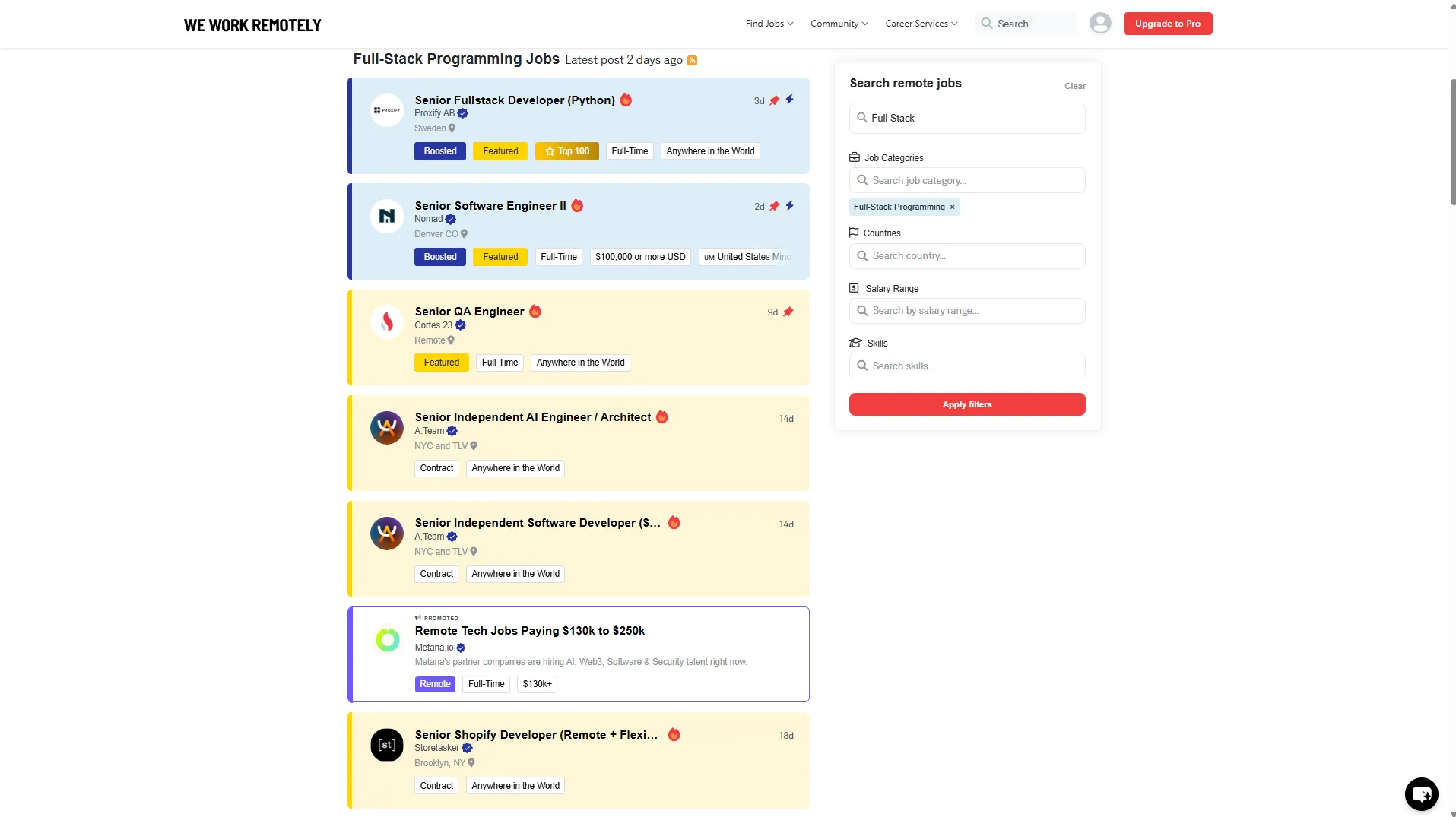
Follow this procedure to find the ideal vacancy:
a) Filter by Category: Go to the main section of the site and scroll through the most in-demand categories, such as Software Development, Design, Customer Support, or Product.
b) Identify Geographic Restrictions: This is the most common mistake for beginners. Although WWR is a remote job portal, many companies limit their hiring due to legal or time zone issues. Pay attention to the location tags:
* Anywhere in the World: You can apply from any country without geographic restrictions.
* USA Only / Europe Only: They only accept candidates who legally reside in those regions.
* Americas / LATAM Friendly: Ideal for candidates from Latin America, valuing time zone alignment.
c) Search for Keywords: Use the site's search engine to type in your primary technology (e.g., React, Python, Figma) and see only the positions that exactly match your profile.
Step 3: Step-by-step example of a real application
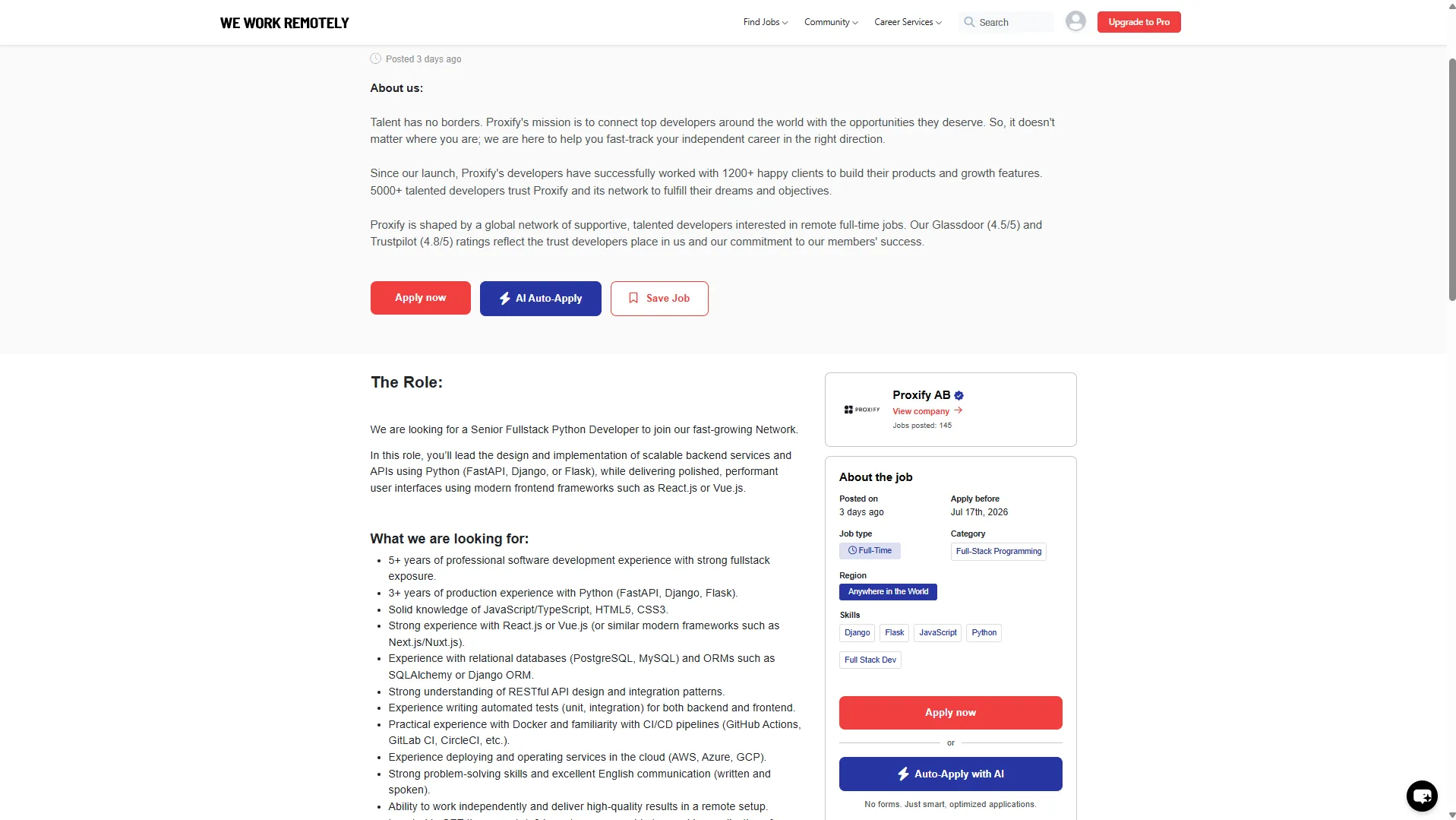
When you find a vacancy on WWR and decide to apply, you will see two main buttons on the job offer. It is crucial to know which one to choose to avoid falling into payment traps:
- The red "Apply now" button (or "Apply for this position"): This is the correct option. It will redirect you directly and 100% free of charge to the company's official job portal (their ATS system).
- The blue "AI Auto-Apply" button (or "Auto-Apply with AI"):Avoid it. It is a paid service integrated by We Work Remotely that will ask you to subscribe to their Premium plan. Furthermore, sending massive automatic applications without adapting your resume to each specific vacancy usually ends in an automatic rejection by the recruiter systems.
Do not use massive AI applications: ATS systems look for specific keywords from each job description. If you use a bot or an AI auto-applier that sends your generic resume to 50 positions, the rejection rate will be close to 100%. It is always better to apply manually and personally to 5 vacancies aligned with your profile than to auto-apply in bulk to 50.
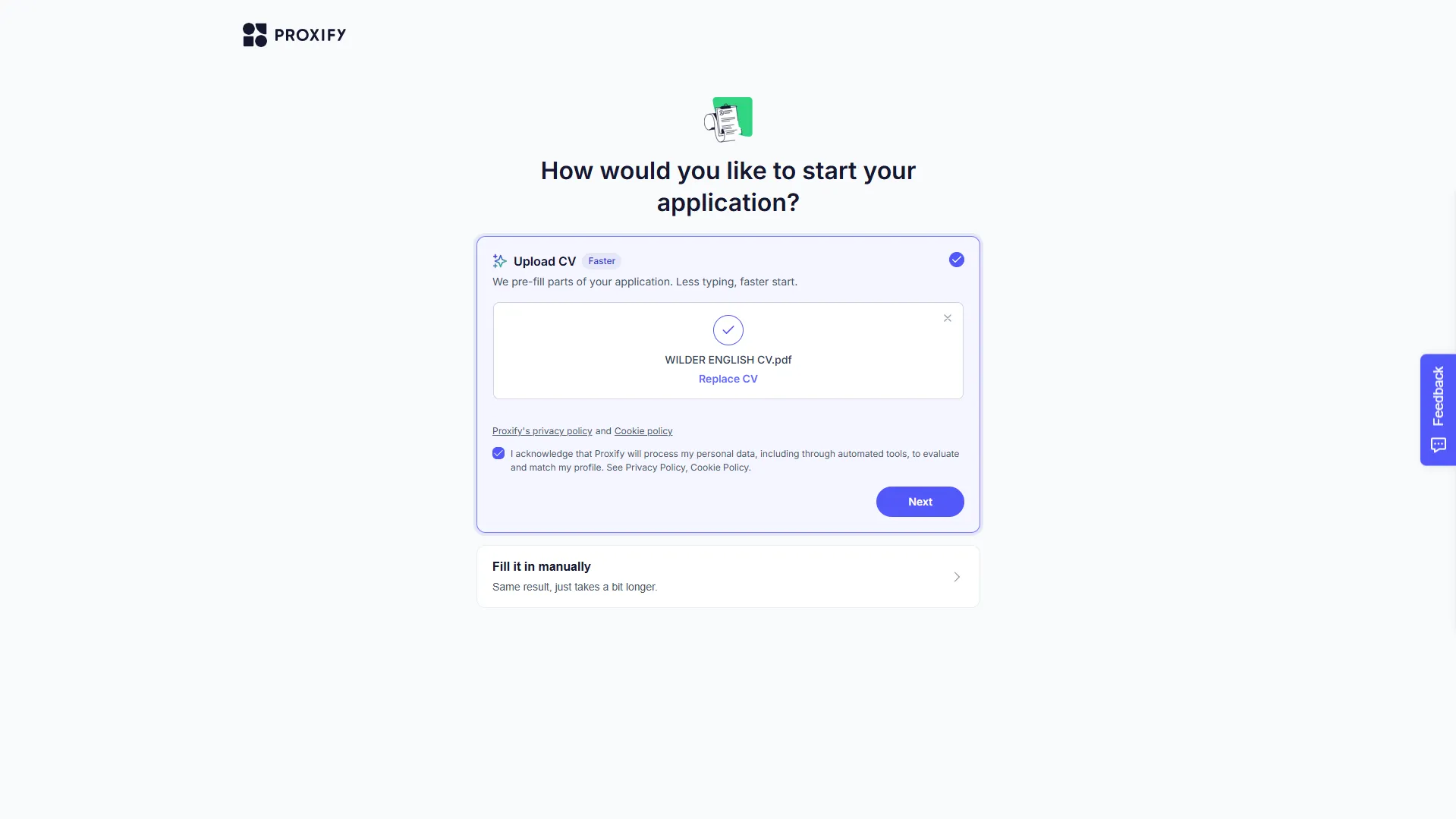
The ATS home screen: Upload resume or Fill in manually?
Once redirected to the company's portal (such as Greenhouse, Lever, or Proxify's own portal), the first question is usually how you want to start your application:
- "Upload CV" option:This is the recommended one. By uploading your resume in PDF format (written in English), the system will use a text extractor to automatically pre-fill the form fields (name, email, experience, education). This will save you a lot of typing time.
- "Fill it in manually" option: Use this only if your resume has a complex visual format that the system cannot process correctly, although remember that an ATS-friendly resume should be readable without issues.
Tips for Submitting Your Application:
Professional File Name: Name your resume file clearly in English (e.g., FirstName_LastName_Resume_Developer.pdf). Never use generic names like updated_cv_2.pdf*.
* Avoid Automatic Autofill: When filling out ATS forms (especially in Lever or Greenhouse), avoid using the browser's autofill function, as it often mixes up fields (putting the address in the phone field, etc.), which corrupts the ATS automatic scanning.
* Clarify Your Contractor Status (B2B): Highlight in your profile or cover letter that you work independently under a B2B contract (filling out the W-8BEN form if the company is US-based). This provides them with tax peace of mind and facilitates their internal accounting.
Real-time expectation and availability questions:
While the ATS processes your resume in the background, many advanced platforms (such as Proxify's) will show you immediate preference questions. We suggest answering as follows:
* How actively are you looking for a job?: Always select "Actively looking for a job". This signals to recruiters that you are ready to start interviews immediately and will prioritize your profile.
* When could you start?: Select "Immediately" or "Within 1-2 weeks". Remote projects highly value speed of onboarding.
* Contract/Work type: Select "Full-time" to demonstrate long-term commitment.
* Minimum monthly rate: The amount varies according to your experience. For LATAM developers applying to Europe or the US, the suggested monthly rates in Euros (€) are:
* Junior:€1,500 to €2,200/month (an ideal midpoint like €1,800/month is very competitive for starting).
* Mid-Level:€2,500 to €3,500/month.
* Senior:€3,500 to €5,500/month.
This is extremely attractive to foreign companies without undervaluing your work.
Screen 4: Personal Data Confirmation (Step 2 of 4)
On this screen, you will easily confirm your basic contact details extracted from your resume: full name, primary email address, phone number with your country code, and your physical location of residence. It is extremely important that this information is accurate and matches your identity document to avoid issues in later stages of legal validation.
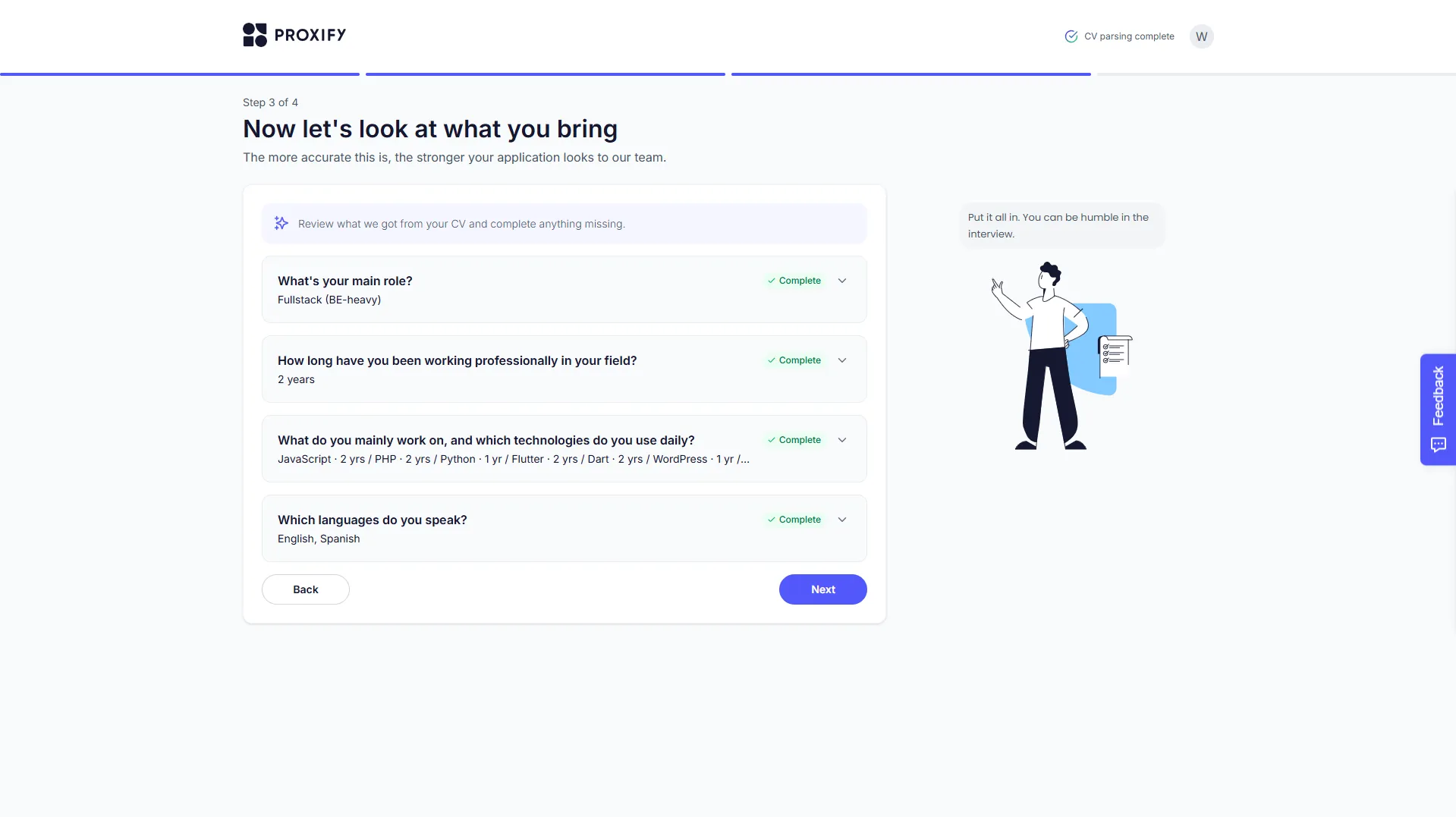
Screen 5: Validation of Experience and Technical Skills (Step 3 of 4)
Here, the ATS will ask you to verify and refine the details of your specialty so that the recruiter team understands your exact profile. Complete the fields with these key suggestions:
- What's your main role?: Select the area where you are strongest. If you master Flutter or mobile development, select Mobile. If you work more with JS/PHP/Python on the server, select Backend or Fullstack (BE-heavy). Choose the option that best describes your specialty.
- How long have you been working...: Review the value pre-filled by your resume's automatic reader. If an excessive amount is shown (e.g., 8 years) and you consider yourself a Junior, click to edit it and reflect your actual programming experience (e.g., 1, 2, or 3 years). Maintaining consistency between your resume, what you declare, and what you will demonstrate in the technical interview will prevent automatic disqualifications due to inconsistencies.
What do you mainly work on...: If you see the yellow "Incomplete"* alert, click to expand the section and verify the years you have worked with each technology (JS, PHP, Flutter, etc.). This will complete the step and enable the button to move forward.
Which languages do you speak?: Validate that your actual languages appear (e.g., English, Spanish*). Remember that working with international companies requires at least a fluent conversational level.
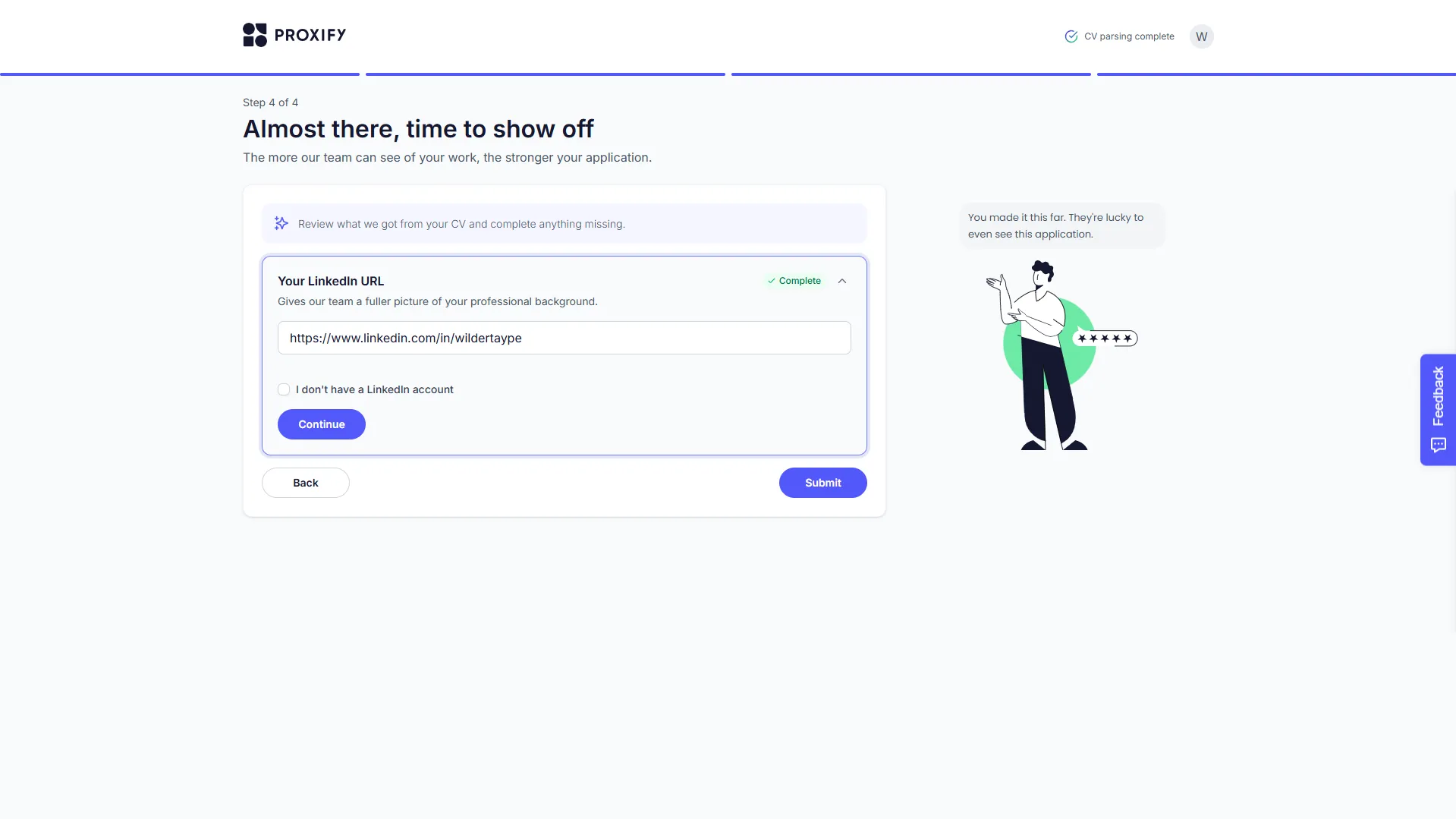
Screen 6: Link to your professional networks (Step 4 of 4)
On the last screen of the ATS form, you will be asked to link your professional networks to show more details about your career:
- LinkedIn Link: Enter the full URL of your professional LinkedIn profile. Ensure that your LinkedIn profile is fully optimized, written in English, and matches 100% with the data (dates, positions, and technologies) you provided in your resume and the ATS form.
- Application Submission: Upon entering the link and clicking Continue, the form will be complete and the Submit button will be enabled to officially send your application to the company.
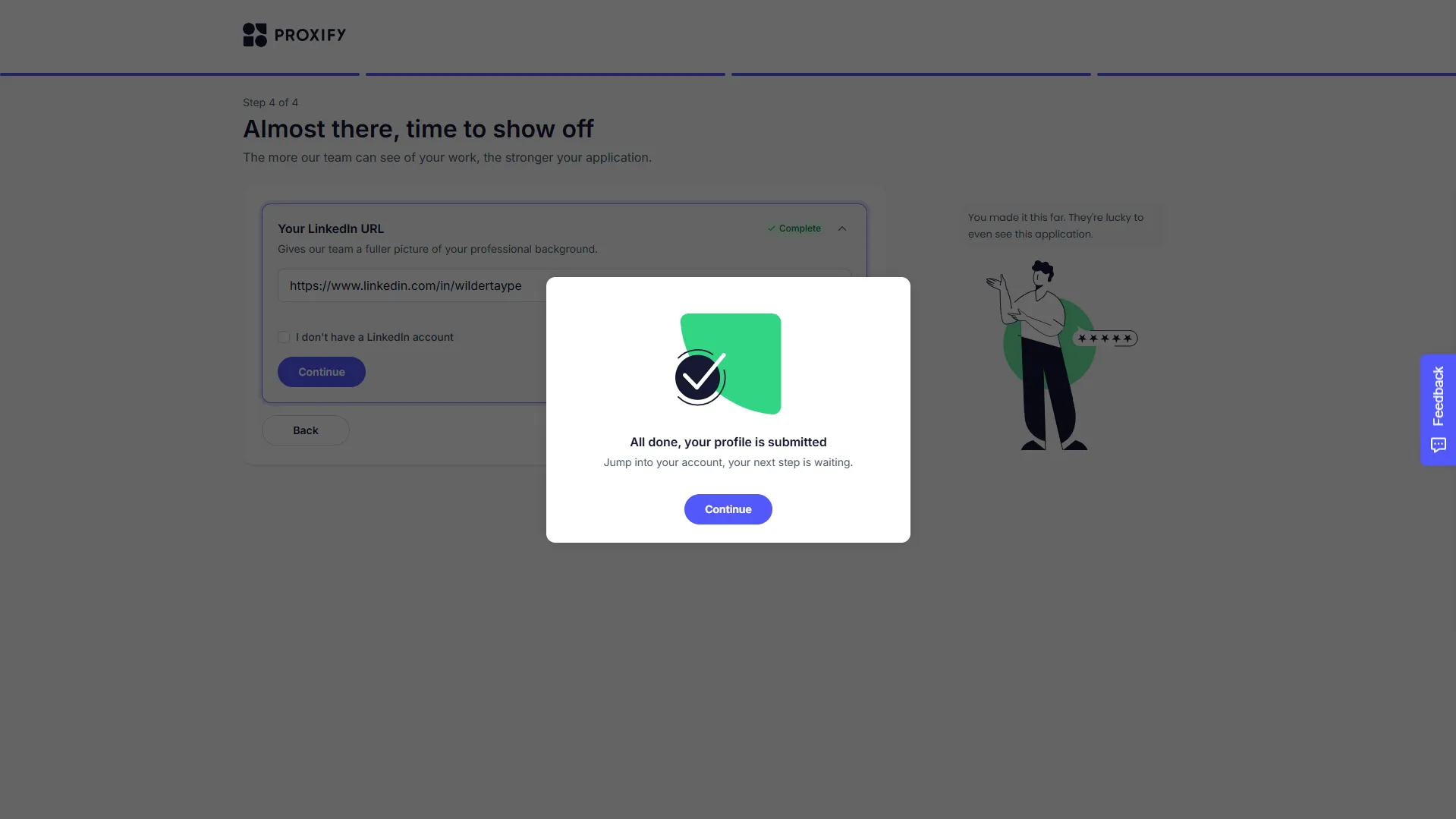
Screen 7: Application Successfully Submitted!
Congratulations! Upon pressing Submit, you will see a pop-up confirmation message that will fill you with excitement and satisfaction: "All done, your profile is submitted". This is a major milestone: you have taken the crucial first step toward opening doors in the international remote job market.
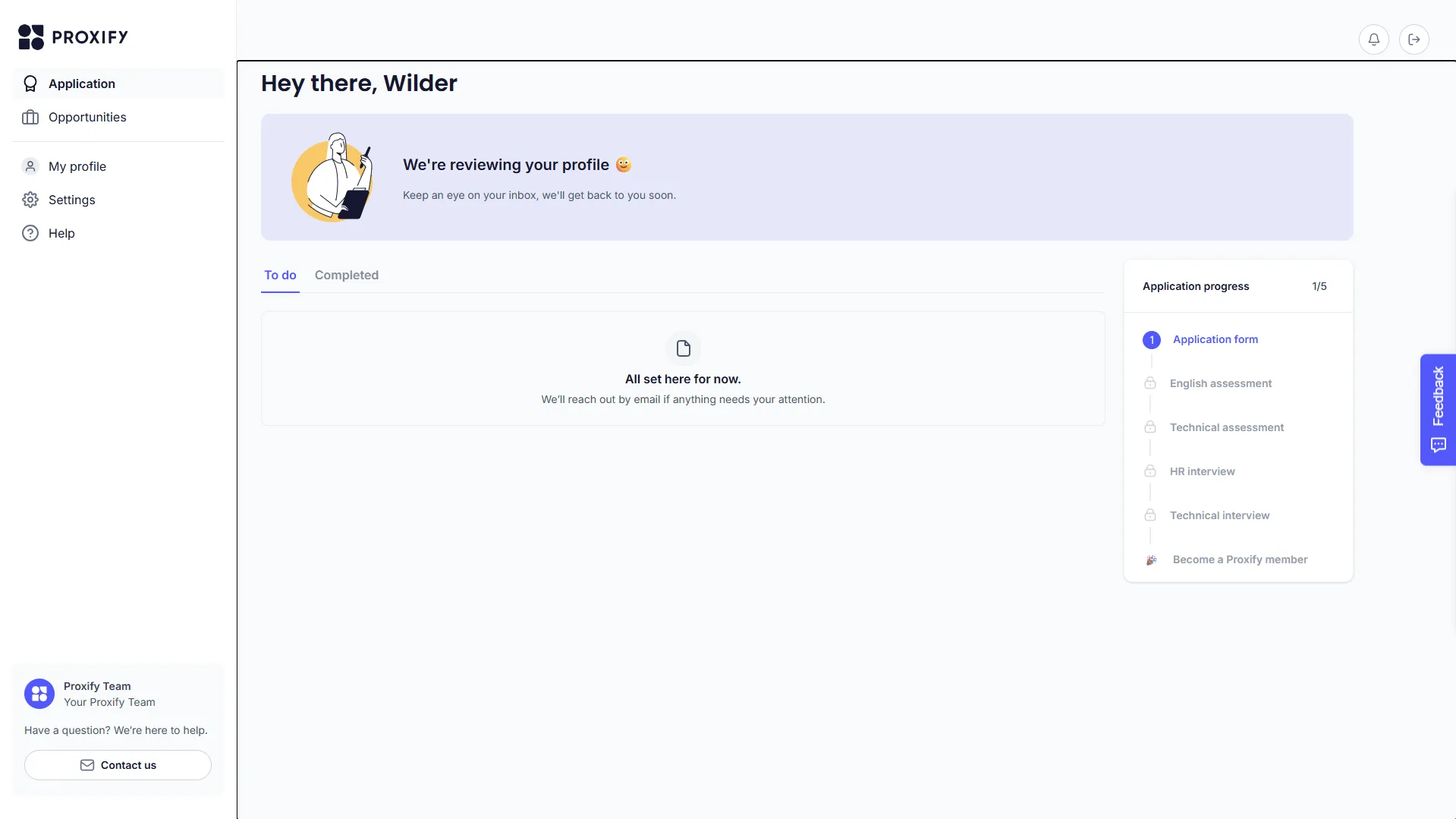
Screen 8: The Talent Dashboard and Candidate Journey
By clicking Continue, the platform will redirect you to your personal candidate dashboard at talent.proxify.io. This dashboard is very user-friendly and shows you a clear and transparent path of the steps to follow to become an official member. This is where it becomes evident that every effort is worth it:
1. Profile Review: The team will review your data and history to confirm initial compatibility.
2. English Assessment: A dynamic test to verify your communication skills.
3. Technical Assessment: A coding challenge or practical test to validate your programming knowledge.
4. HR Interview: A chat to get to know your personality, goals, and cultural fit.
5. Technical Interview: A problem-solving session with an expert.
Seeing the dashboard with the message "We're reviewing your profile 😃" will give you the peace of mind of knowing exactly where you stand in the process and how to prepare to shine in the following stages. When you are ready to start your tests, remember that you can reopen your control panel directly at talent.proxify.io and log in to complete each test at your own pace.
Golden Tips for Tackling Tests and Evaluations:
* Don't rush, prepare first!: Although the English and coding tests are unlocked in your dashboard, you don't need to take them immediately. It is much better to take 2 to 5 days to prepare calmly. Entering the test prepared and well-rested multiplies your chances of success.
* How to prepare for the English test: Practice speaking out loud in front of a mirror, review how to describe your past projects and your daily experience in professional English. Don't look for grammatical perfection, but rather fluency and clarity in your ideas.
* How to prepare for the technical test: Review basic algorithms, data structures, and key concepts of your main technologies (e.g., lifecycles in React, asynchronous requests in JS, or state management in Flutter). Doing some simple coding exercises will help you warm up.
* Optimal environment: When you decide to start, do it from a quiet room, without distractions, with good lighting, and ensure you have a stable internet connection. Mental peace is your best ally!
2. Useful Workwii resources to boost your application
To make your journey easier and ensure your profile stands out to international recruiters, we have designed a set of free AI-powered tools that will optimize every stage of your job search:
| Resource / Tool | :yes: How does it help you? | Direct Access |
|---|---|---|
| My Resumes | Upload, manage, and always have multiple versions of your professional resume ready to apply instantly. | Upload and Improve Resume |
| AI Resume Builder | Design your resume from scratch in a 100% professional way, with templates optimized to pass ATS filters. | Create Professional Resume |
| Resume Translator | Translate your resume into English with impeccable technical precision, ideal for the international market. | Translate Resume to English |
| AI Resume Analyzer | Scan your resume against the job description's ATS to identify missing keywords and skills. | Scan and Optimize Resume |
| Cover Letter Generator | Write persuasive cover letters tailored to each job description in seconds. | Create Cover Letter |
| Interview Guide | Master the toughest behavioral questions by training your answers with the powerful STAR format. | Practice for the Interview |
3. Conclusions: Take the step toward your remote future with confidence
Applying for international job offers on platforms like We Work Remotely may seem like a huge challenge at first, but as we have seen in this guide, it is a path taken one step at a time. The key to standing out in today's competitive market lies in honesty in your profile, consistency of your data, and preparation before each evaluation.
Do not let fear or "imposter syndrome" hold back your professional goals. Every completed form, every adapted resume, and every test taken represents valuable learning that brings you closer to your ideal job. Maintain a constant attitude of hope, trust in your talent, and be certain that the global market immensely values the dedication, adaptability, and drive of Latin American professionals. Your remote future is waiting for you, and we are here to support you every step of the way!